STKO
Complete pre-processor and post-processor for OpenSees, for structural and geotechnical analysis without writing TCL scripts.
Asdea Software Technology provides innovative tools and expert services for structural modeling, seismic analysis, Digital Twin development, and scientific software solutions.
We have developed STKO (Scientific ToolKit for OpenSees), which is the most advanced graphical interface for OpenSees. Additionally, we offer expert consultancy, custom software development, and Digital Twin solutions to researchers, engineers, and organizations around the world.
Innovative Software solutions for a brighter Future
Complete pre-processor and post-processor for OpenSees, for structural and geotechnical analysis without writing TCL scripts.
The version of STKO built for engineering practice: nonlinear analysis in repeatable workflows, with AI assistance inside the model.
Web platform for 3D visualization and traffic evaluation on the bridges of a road network.
Web dashboard for structural health monitoring, running on the on-site PC: it keeps working even without an internet connection.
The ASDEA software for structural health monitoring: OSP, data processing, OMA and Damage Detection on the same data format.
STKO, the Scientific ToolKit for OpenSees, is the earthquake engineering software developed by ASDEA Software Technology for structural and geotechnical analysis. It allows engineers, researchers and students to create, analyze and visualize complex models without writing TCL scripts manually.


Models are built and validated from the graphical interface, ready for OpenSees.
Simulation results are interpreted visually.
Simulations of complex structures.
Geotechnical models in the same environment as the structures.
Software built for earthquake engineering.
Structure and soil simulated together, in a single model.
A complete pre-processor and post-processor for OpenSees.
With STKO you visually build, validate, run and interpret simulations.
No TCL scripts to write by hand.
STKO PRO is the version of STKO built for engineering practice. Based on the proven STKO/OpenSees nonlinear foundation, it brings advanced analysis into professional workflows. STKO PRO is a dedicated product, separate from STKO, offered with an annual professional license.


Pushover, response-history analysis, modal analysis and response spectrum.
Available alongside nonlinear analysis.
Performance-Based Design (PBD) workflows.
Loads, constraints, analysis presets and model definition are organized into repeatable workflows.
Tested, recognized and documented components for modeling decisions that can stand up to review.
AI assistance works inside the model: every action stays visible.
Most structural software starts from linear analysis and adds nonlinear capabilities later as an advanced option; STKO PRO takes the opposite approach.
Advanced analysis leads to clearer project deliverables.
The engineer stays in command.
Bridge Sense is the web platform for 3D visualization and traffic evaluation on bridges. It brings together the bridges of a road network on a map, along with toll gates and intersections.


Each vehicle is defined with its axles, loads and spacings.
On the map you pick a route between a start and an end point and the traffic lanes to follow.
Simulations on every bridge along the route, with load amplification factors.
Results on each bridge model, with the internal force diagrams.
Demand/capacity ratio and most critical combination per lane.
Applied to speeds above 30 km/h.
Report with charts and images.
For each bridge it collects the structural model developed with STKO and OpenSees, the documents and the technical notes.
Simulation progress is tracked in real time.
Capacities can be overridden where specific checks are needed.
MonStr True Vision is the web dashboard for structural health monitoring. It runs on the acquisition PC installed on site, where data are collected, stored and processed locally.
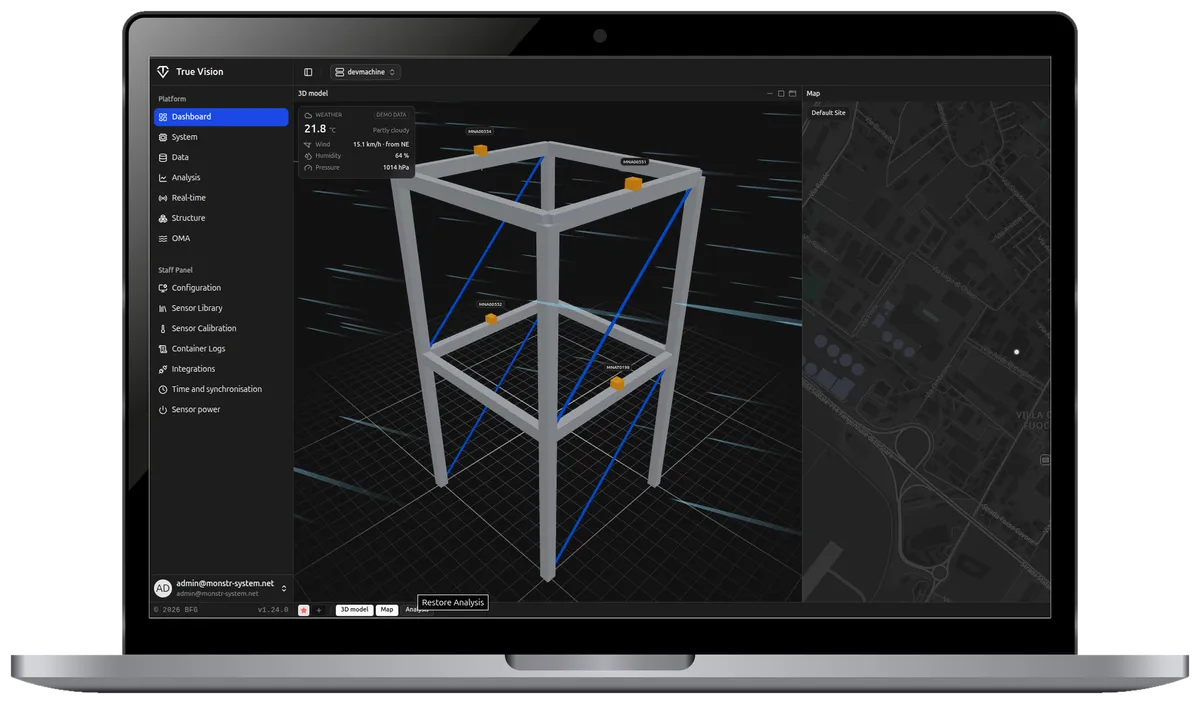
From the dashboard you control the whole installation, from the status of dataloggers and sensors to the signals.
Sensor signals are followed in real time.
You scroll through the recording timeline and check the recording quality.
Several sensors, devices and axes on the same chart.
Natural frequencies, damping ratios and mode shapes, animated on a model of the structure.
The site map stays available even without internet.
Data ready for STKO.
With a single login you enter from one address in the browser and switch between systems in the same window.
The system keeps working even without an internet connection.
Installations are reached through a VPN.
Each customer only sees their own installations, while the data stay on the on-site PC.
The SHM tool suite brings together the software ASDEA has developed for structural health monitoring.
Optimal Sensor Placement (OSP) starts from the numerical model of the structure and indicates how many sensors to install and where, to collect more information with fewer devices.
The processing tools clean and select the signals recorded by MonStr sensors, discard noisy or irrelevant recordings and prepare the data for structural identification.
Operational Modal Analysis (OMA) identifies the vibration modes and frequencies of a structure from the vibrations measured during normal operation. The modal parameters calibrate the numerical models developed in STKO.
MonStr AI combines data-driven and model-based methods to detect anomalies and damage and predict the behavior of the structure. The digital twin in STKO verifies the anomalies and rules out false alarms.
Like the MonStr sensors, every tool is developed in-house and works on the same data format.
Data-driven algorithms and model-based tools are managed in the same virtual environment provided by STKO, initially designed for finite-element analysis and now extended for sophisticated digital twinning applications.
Parallel computing, GPU programming, big data analysis, cloud computing and real-time charts.
Data can be visualized anywhere, at any time.